
Crédits et cartes-cadeaux Proton
- Lecture
- 5 minutes
- Catégorie
- Codes cadeaux, crédits et prorata
Les crédits sont des bons d’achat numériques qui peuvent être utilisés pour un abonnement Proton. Vous pouvez ajouter des crédits directement à votre compte ou acheter une carte-cadeau pour quelqu’un d’autre.
Si vous passez d’un abonnement Proton payant à un autre, les jours non utilisés de votre ancien abonnement sont convertis en crédits et déduits du coût de votre nouvel abonnement.
- Comment acheter des crédits
- Comment consulter votre solde de crédits
- Comment acheter une carte-cadeau
- Comment utiliser une carte-cadeau, un code de réduction ou un code cadeau
- Qu’est-ce que le prorata ?
- Comment les crédits et les cartes-cadeaux sont-ils calculés lors du paiement ?
- Attention aux faux codes cadeaux
Comment acheter des crédits
- Connectez-vous à account.proton.me.
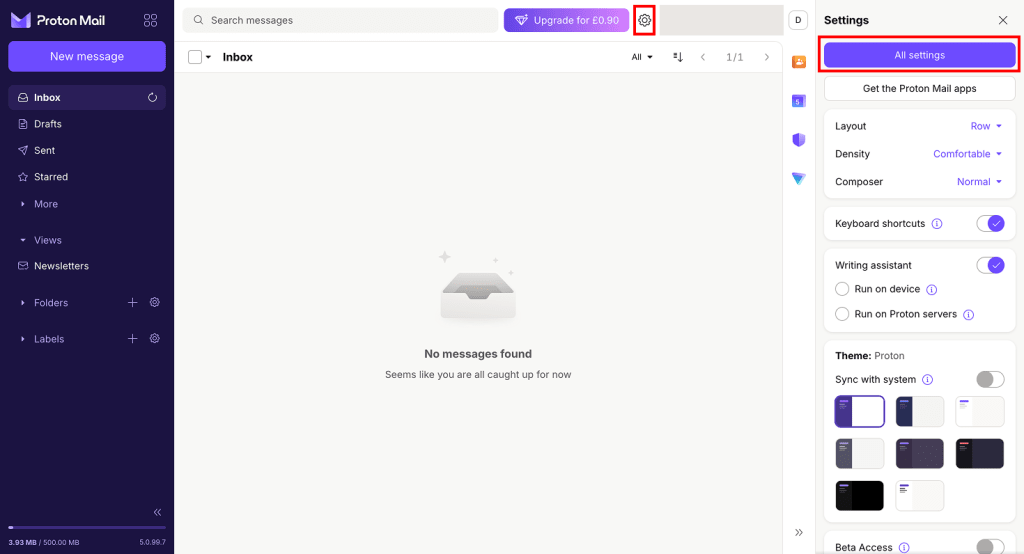
- Ouvrez vos paramètres d’abonnement (allez dans Paramètres ⚙️ → Tous les paramètres, puis sélectionnez Abonnement dans la barre latérale).

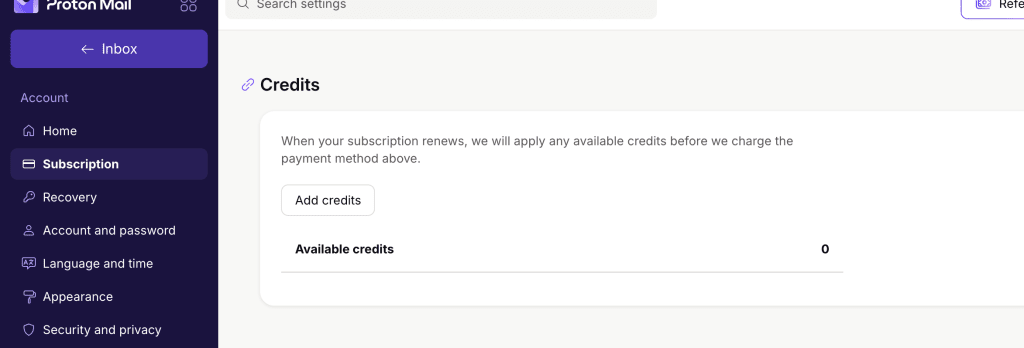
- Faites défiler jusqu’à Crédits et cliquez sur Ajouter des crédits.
- Sélectionnez le nombre de crédits que vous souhaitez ajouter, sélectionnez un moyen de paiement et saisissez vos informations de paiement. Cliquez sur Recharger pour confirmer.
- Si vous n’avez jamais eu d’abonnement payant, vous pouvez sélectionner une devise. Sachez toutefois que les crédits ne peuvent être appliqués qu’aux paiements dans la même devise. Si vous avez déjà eu un abonnement payant, la devise d’achat des crédits est définie pour correspondre à la devise dans laquelle vous avez payé.
Si vous payez en Bitcoin, par virement bancaire ou en espèces, les crédits seront ajoutés à votre compte une fois que nous aurons reçu votre paiement. Découvrez comment payer avec ces moyens de paiement
Voilà, c’est fait. Vos crédits seront automatiquement appliqués au paiement de votre prochain abonnement. Si vous souhaitez utiliser des crédits pour régler une facture impayée, vous devrez les appliquer manuellement à la facture.
Vous pouvez recharger votre solde de crédits à tout moment en ajoutant des crédits, qui seront ensuite utilisés pour couvrir automatiquement vos futurs renouvellements. Vous pouvez ajouter jusqu’à 1 000 crédits à la fois. Une fois ajoutés, ils seront automatiquement appliqués lors du renouvellement de votre abonnement.
Comment consulter votre solde de crédits
- Connectez-vous à account.proton.me.
- Ouvrez vos paramètres d’abonnement (allez dans Paramètres ⚙️ → Tous les paramètres, puis sélectionnez Abonnement dans la barre latérale).
- Faites défiler jusqu’à Crédits. Vous verrez votre solde sous Crédits disponibles.

Cartes-cadeaux
Les cartes-cadeaux sont des bons d’achat numériques. Vous pouvez les acheter pour d’autres personnes ou les ajouter à votre propre solde de crédits. Les cartes-cadeaux sont disponibles sur le Proton Shop(nouvelle fenêtre).
Comment acheter des cartes-cadeaux
1. Rendez-vous sur le Proton Shop(nouvelle fenêtre) et sélectionnez une carte-cadeau Proton.

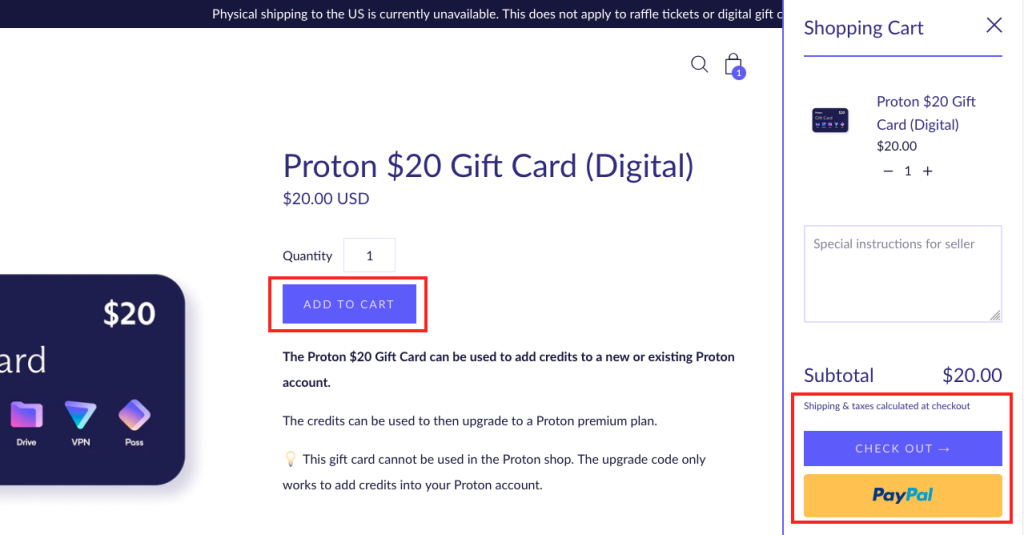
2. Sélectionnez la Quantité de cartes que vous souhaitez acheter, puis cliquez sur Ajouter au panier. Sélectionnez ensuite Passer la commande pour payer en utilisant l’un de nos moyens de paiement acceptés, ou PayPal pour un paiement rapide.
3. Sélectionnez un moyen de paiement et saisissez vos informations de paiement.

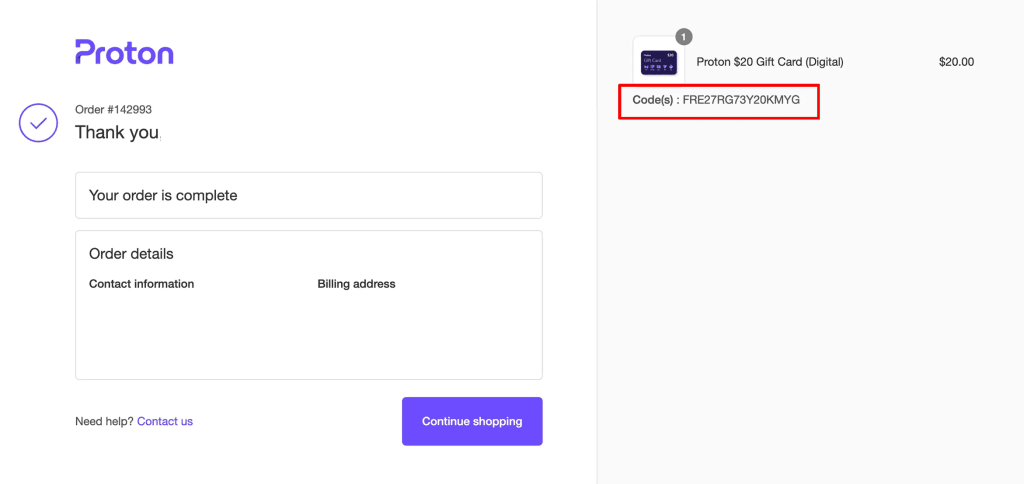
4. Une fois l’achat effectué, vous verrez votre code-cadeau s’afficher sur la page de confirmation de commande après quelques secondes. Vous recevrez également un e-mail de la part de shop@orders.proton.me contenant un lien vers vos codes.
Comment utiliser une carte-cadeau, un code de réduction ou un code cadeau
Il existe deux façons d’utiliser une carte-cadeau ou un code de réduction Proton :
- Recharger votre solde de crédits
Cela convertira la valeur de votre code en crédits Proton, qui seront automatiquement appliqués à votre prochain achat ou paiement d’abonnement.
- Ouvrez vos paramètres d’abonnement (allez dans Paramètres ⚙️ → Tous les paramètres, puis sélectionnez Abonnement dans la barre latérale).
- Faites défiler jusqu’à Code-cadeau. Saisissez votre code et cliquez sur Envoyer.

- Appliquer votre code à un achat
Vous pouvez également appliquer votre carte-cadeau à un achat.
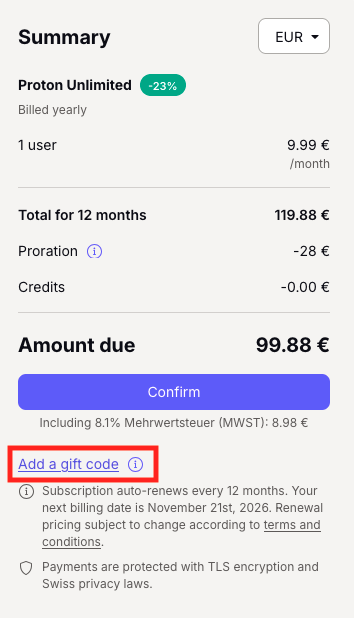
- Lors du paiement, cliquez sur Ajouter un code-cadeau (vous trouverez cette option dans la barre latérale Résumé , sous le bouton Confirmer ).
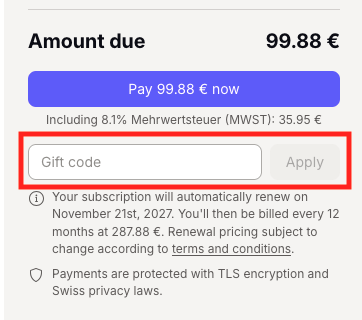
- Saisissez votre code-cadeau et cliquez sur Appliquer.
Qu’est-ce que le prorata ?
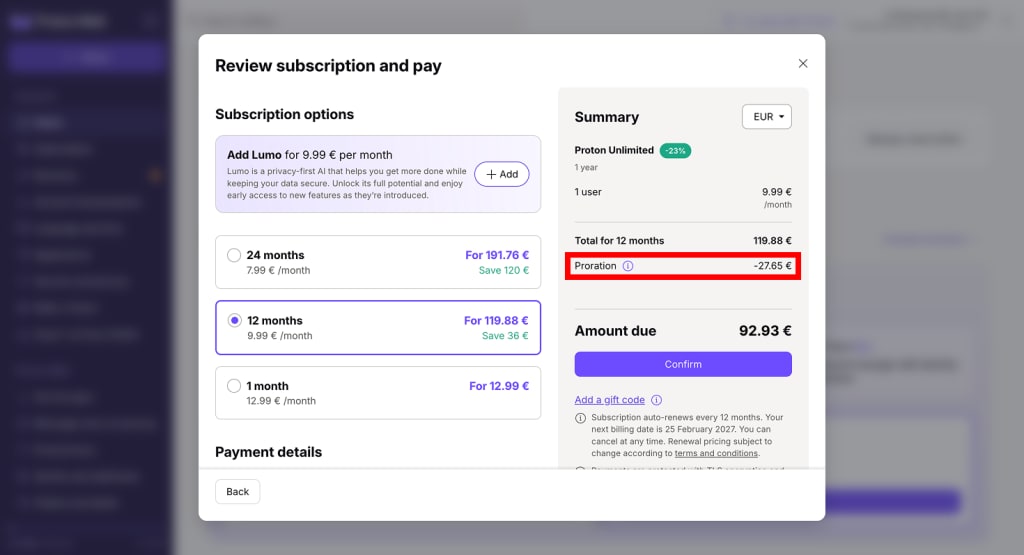
Lorsque vous passez d’un abonnement Proton payant à un autre, nous mettons fin à votre ancien abonnement et activons le nouveau immédiatement. Pour vous éviter de payer deux fois, nous convertissons le temps non utilisé de votre ancien abonnement en crédits, qui sont automatiquement appliqués au coût de votre nouvel abonnement.
Ce montant apparaîtra dans votre résumé de paiement sous Prorata.
Vous n’obtiendrez pas de crédits au prorata si vous annulez votre abonnement (rétrogradation vers Proton Free). En effet, votre abonnement payant ne prend pas fin de manière anticipée — il expire à la fin de votre période de facturation.
Comment sont calculés les crédits au prorata
(coût de l’abonnement / nombre total de jours de l’abonnement) x (nombre de jours restants)
Exemple : vous passez de Proton Family (1 mois) à Proton Unlimited – 12 mois.
Vous avez payé 29,99 €/mois pour Proton Family – 1 mois, et il vous restait 28 jours d’abonnement. Nous déduisons donc 28 € (29,99 €/30×28 = 28 €) du paiement de votre nouvel abonnement.
Comment les crédits et les cartes-cadeaux sont-ils calculés lors du paiement ?
Voyons comment les crédits de compte, le prorata et les cartes-cadeaux fonctionnent en pratique.
Dans cet exemple, Eric Norbert change d’abonnement en passant de Proton Mail Plus (12 mois, 47,88 €) à Proton Unlimited (12 mois, 119,88 €). Il a :
- 20 € de crédits de compte
- une carte-cadeau de 15 € à utiliser
- 100 jours restants sur son abonnement Mail Plus (ces jours inutilisés seront convertis en prorata)
Voici comment son prix serait calculé :
[prix du nouvel abonnement] – [crédits] – [carte-cadeau] – [prorata*]
119,88 EUR – 15 EUR – 20 EUR – 13,12 EUR = 71,76 EUR.
*Calcul du prorata : [coût de l’abonnement / nombre total de jours de l’abonnement] × [nombre de jours restants]
Méfiez-vous des faux codes cadeaux
Des sites internet frauduleux proposant de faux codes cadeaux Proton Mail ont été signalés.
Si vous voyez un bon ou un code de réduction Proton Mail annoncé sur un site internet autre que proton.me ou protonvpn.com(nouvelle fenêtre), soyez prudent, car ces sites peuvent être malveillants.
Le bon de réduction pourrait être faux — et dans le pire des cas, le site pourrait être un site d’hameçonnage(nouvelle fenêtre) tentant de voler vos identifiants.
Si vous avez des questions, n’hésitez pas à contacter notre équipe de support.