

As of December 2025, Meta is using your interactions with Meta AI — its AI chatbot — to personalize ads and content across Facebook, Instagram, and WhatsApp. When you chat with Meta AI about weekend plans, parenting struggles, or major life decisions, those conversations are now fair game for advertisers.
The change(новое окно) applies in nearly every region, with exceptions in the EU, the UK, and South Korea, where strong privacy regulations like the EU’s GDPR remain in place.
In-app preferences let you dial back ad personalization, but they are still limited to what Meta allows. The system is set up in a way that makes it difficult to reduce ads and personalization consistently. Many ad preferences need to be revisited regularly as they can change based on how you use the apps, and they don’t fully stop behavioral targeting.
Here’s why AI chat data is worse for creating personalized ads, and what you can do about it.
- Why AI chat data is more invasive for ad targeting
- The Meta AI ecosystem collects more than chat data
- How to stop ads on Meta apps
- Use private tools that don’t monetize your data
Why AI chat data is more invasive for ad targeting
Meta’s advertising engine has always relied on detailed behavioral profiles built from everyday platform activity: clicking on ads without buying, saving posts for later, or watching (or skipping) videos.
What’s new (and more troubling) is the kind of data being harvested. Unlike likes, shares, or comments, which are public actions, AI chats are inherently more intimate. People tend to speak more openly(новое окно) in one-on-one conversations with AI, asking questions they wouldn’t post publicly or search directly. AI assistants are often treated like confidants, encouraging users to explain situations in detail and talk through decisions step by step.
Many may not realize this seemingly private information can be used for AI training and product improvement, often due to vague disclosures, hard-to-find privacy settings, and defaults that favor data collection.
Meta now has access to your unfiltered stream of personal thoughts shared with Meta AI, which it can use to build smarter ad systems that identify when you’re stressed, lonely, bored, or impulsive and push the right ad — even if that means exposing you to 15 billion high-risk scam ads.
The Meta AI ecosystem collects more than chat data
Beyond AI chat data, this policy update allows Meta to use AI interactions across its entire ecosystem to learn about you and serve you targeted ads, including:
- Meta smart glasses: These collect photos and video and voice recordings, then analyzes them with AI to extract insights about your behavior and interests.
- Meta Vibes: An AI-powered short-form video feed that tracks what you watch, skip, replay, or interact with.
- Meta AI Image Generator: An AI image generation and editing tool that can analyze your prompts and uploaded photos (including any embedded information such as objects, text, locations, or context) to learn your interests, habits, or intentions.
How to stop ads on Meta apps
You can turn off Meta personalized ads by switching to a paid subscription, but that doesn’t guarantee Meta will stop collecting data about you in the background. The most effective way to prevent Meta from using your personal account data is to delete your accounts and stop using Meta-owned apps and products. Even then, Meta may build a shadow profile with information about you using limited, non-account data via third-party websites and apps that integrate Meta trackers, unless you actively block them(новое окно).
If you’re not ready to leave Meta’s apps just yet, there are still steps you can take to reduce how much data Meta collects and uses:
Turn off personalized ads on Facebook and Instagram
You can change your ad preferences on Facebook and Instagram to reduce how aggressively you’re targeted.
In your Facebook or Instagram app, go to Settings → Account Center → Ad preferences.
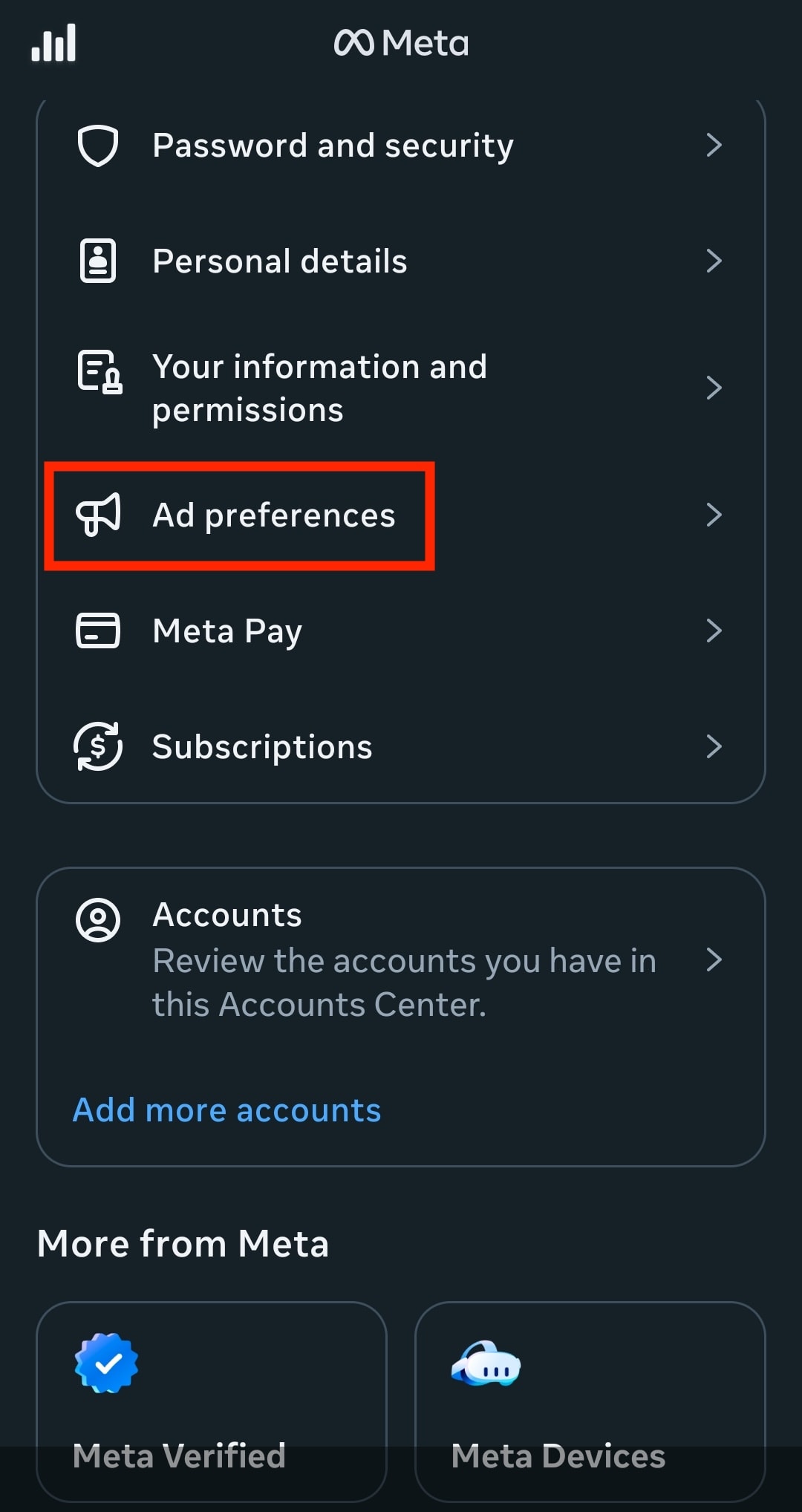
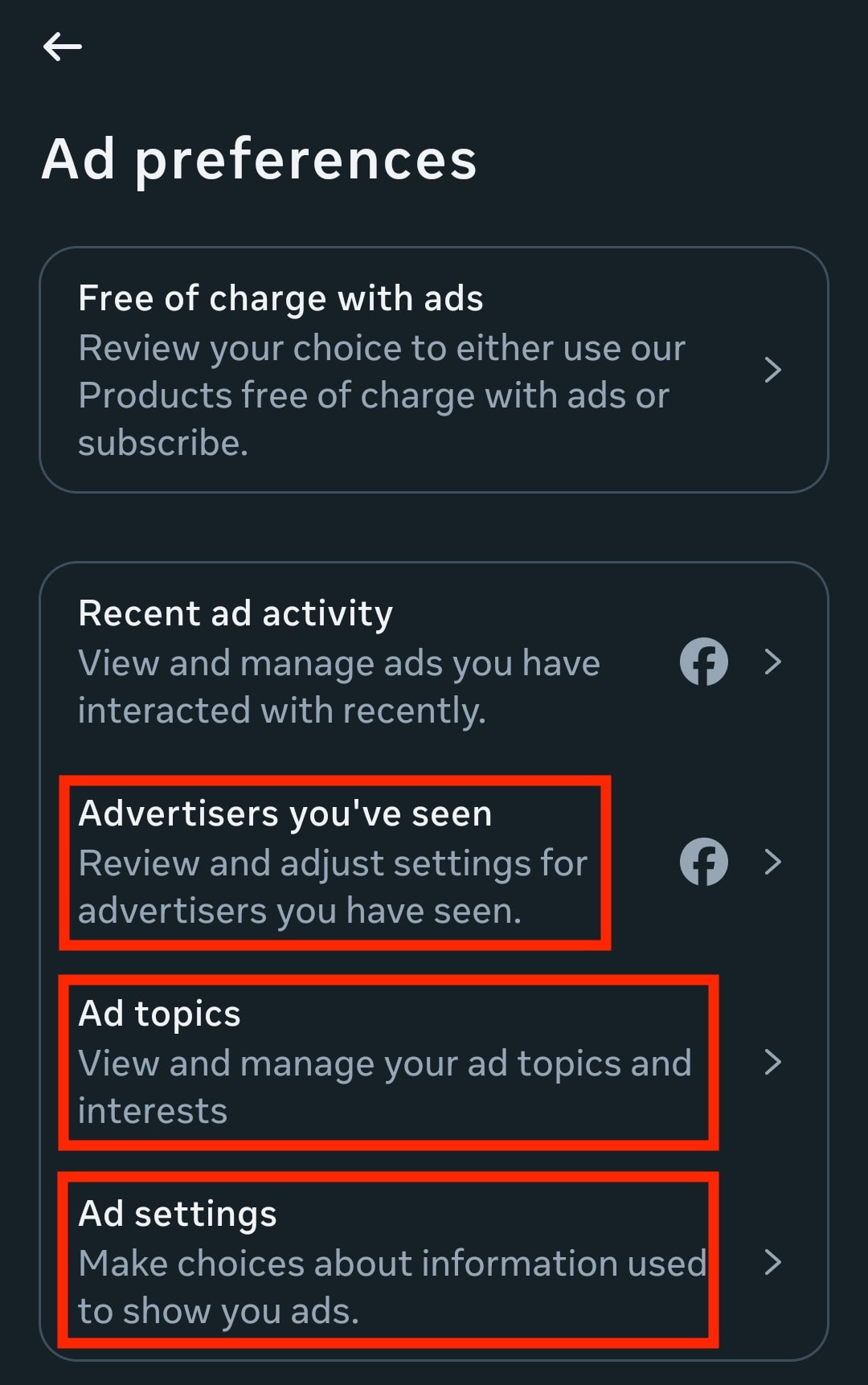
Once there, you can:
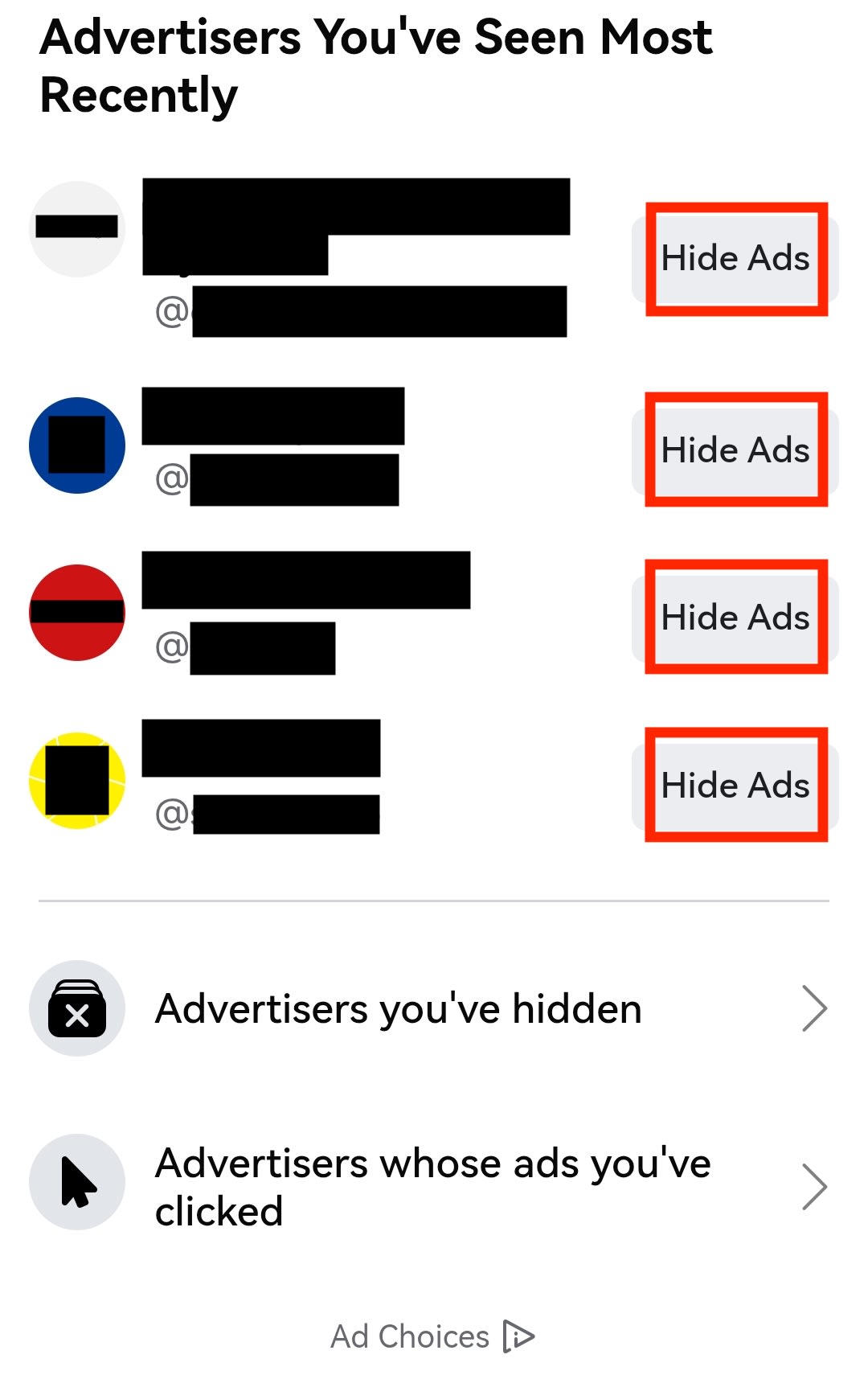
- Review advertisers you’ve seen: Tap Advertisers you’ve seen and choose Hide Ads for each one. If you interact with new advertisers, you’ll have to come back here and repeat this process regularly.
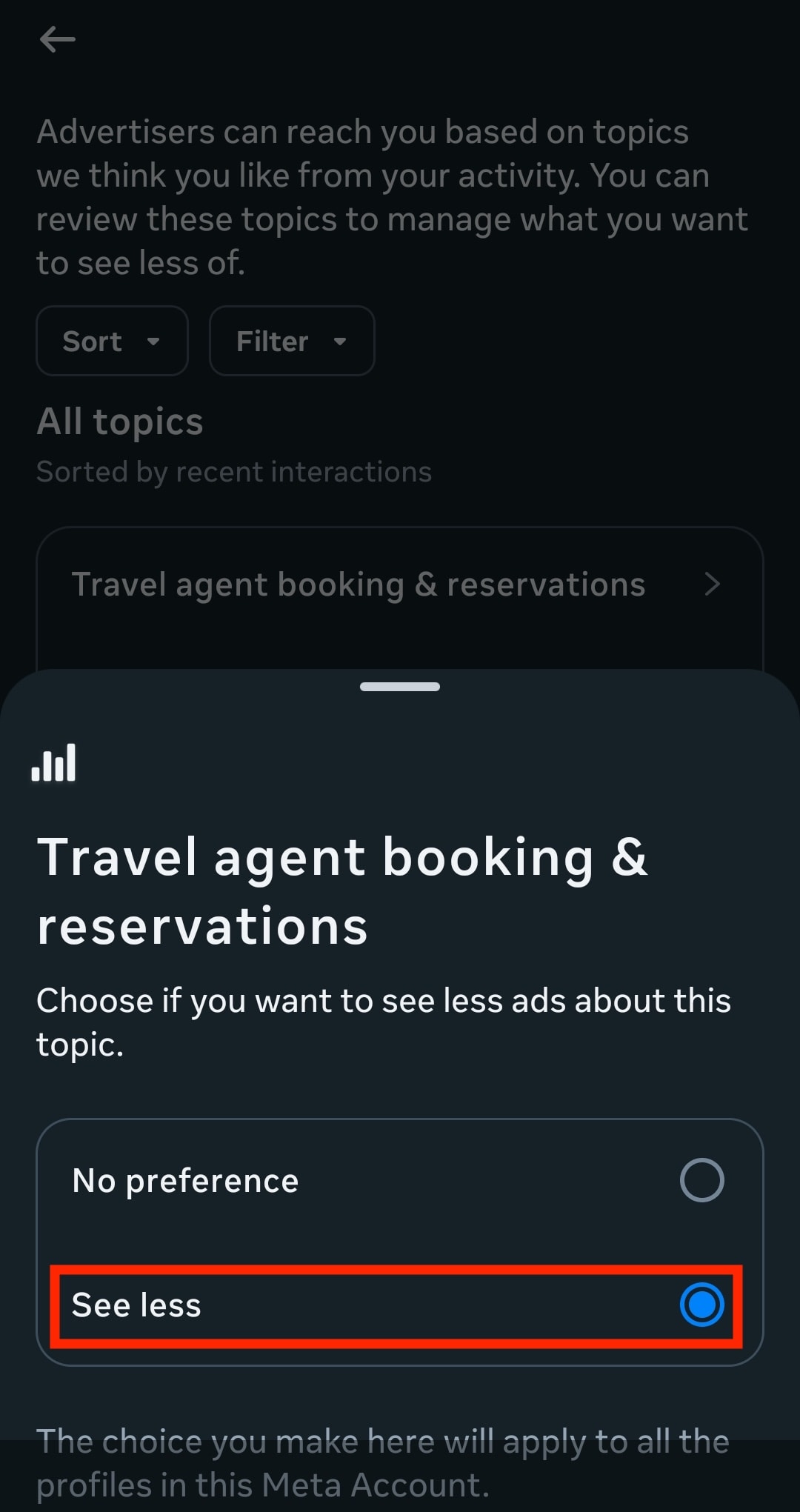
- Manage ad topics used to target you: Tap Ad topics, select each topic, and choose See less. These preferences reset if you interact with new ad categories, so you’ll need to review them often.
- Limit ad personalization: Go to Ad settings → Ad experience and select Less-personalized ads. Even with this option enabled, Meta can still use some of your information (including your age, gender, location, the content you view, and how you interact with ads) to show you ads that aren’t technically “personalized.” Plus, your browsing may be paused by ad breaks.

If your Facebook and Instagram accounts aren’t connected in the Account Center, you’ll need to repeat these steps separately for each account.
Keep your Meta accounts separate
Meta uses its Accounts Center to combine data from Facebook, Instagram, and WhatsApp and build a more complete picture you. So keeping your accounts separate reduces how much of your activity is pooled together.
Here’s how to check and limit account linking:
- On Facebook or Instagram, open Settings → Accounts Center → Accounts.

- You’ll see Facebook, Instagram, or WhatsApp accounts linked under your name. Select an account and tap Remove.

- Select Remove account → Continue → Yes, finish removing.
Meta may prompt you again to connect your accounts, but you can decline. You should check your Account Center settings occasionally to make sure your preferences haven’t changed.
Avoid engaging with Meta AI
If you don’t interact with Meta AI through chat, voice, or prompts, Meta will have less information to use for personalizing ads. For example, Meta AI may appear in your search bar, comments, or direct messages. If you see prompts to “ask Meta AI” or “chat with Meta AI,” avoid clicking or replying. Find out more about how to limit Meta AI on Facebook, Instagram, and WhatsApp.
Send an opt-out request to Meta
- Sign in your Facebook or Instagram account.
- Go to Settings → Privacy Center → object.

- Set your location and select How can I object to the processing of my information? (or similar wording).
- Choose the type of objection you want to submit:

- I want to object to the use of my information for Meta AI: This prevents Meta from using your public content and your interactions with its AI chatbot.
- I want to object to the use of my information from third parties for Meta AI: This applies to information about you collected from external sources, such as public websites or data Meta licenses from third parties.
- I have a different objection to the use of my information: Use this option for any other concerns, such as objecting to data use based on legitimate interests, marketing purposes, or other privacy issues not listed above.
- Follow the on-screen prompts to complete and submit an opt-out form. You must fill out a form for each request type.
- Wait for confirmation. Meta will send you an email once it processes your opt-out request.
These requests only affect future use of your data with Meta AI, so anything already used to train Meta’s AI can’t be deleted. Plus, if you have more than one account (like both Facebook and Instagram), you’ll need to send a separate request for each one, unless your accounts are linked through Meta’s Accounts Center.
Use private tools that don’t monetize your data
Surveillance-based advertising isn’t the only tech business model, and we created Proton in 2014 to give you a meaningful alternative to services you use every day. If the idea of your AI chats and interactions being turned into ad indicators feels invasive, choose privacy-first services to opt out of being constantly analyzed, nudged, and monetized.
We built our private AI assistant(новое окно), Lumo, so you can safely share sensitive information knowing your conversations won’t be used to train AI models, build behavioral profiles, or target you with ads. Lumo doesn’t keep any record of your chats, and your chat history is stored with zero-access encryption so only you can access it.
Lumo is also integrated with Proton Drive, our end-to-end encrypted cloud storage service. So you can add files to your chats to give Lumo additional context or get help analyzing documents. Lumo and Drive are both part of our encrypted suite of privacy-first tools that help you take back control of your data.
Privacy isn’t something you should have to constantly manage in settings menus. It should be the default, especially as AI becomes more deeply embedded into everyday tools.

